一條蟲爬上皇帝最重要的部位 (猜運動名稱)
答案係..
爬龍舟....
星期日, 2月 22, 2009


星期六, 2月 21, 2009
black magic - 嘩嘩嘩
"嘩 嘩 嘩" 係 M
"嘩 嘩 嘩 嘩 嘩 嘩 嘩 嘩 嘩" 係 S
咁"嘩 嘩 嘩 嘩 嘩" 又係 M
"嘩 嘩 嘩 嘩 嘩 嘩 嘩 嘩 嘩 嘩 嘩" 係咩 ??
=====
解說:
"嘩 嘩 嘩" = March
"嘩 嘩 嘩 嘩 嘩 嘩 嘩 嘩 嘩" = September
"嘩 嘩 嘩 嘩 嘩" = May
所以...
"嘩 嘩 嘩 嘩 嘩 嘩 嘩 嘩 嘩 嘩 嘩" = November
"嘩 嘩 嘩 嘩 嘩 嘩 嘩 嘩 嘩" 係 S
咁"嘩 嘩 嘩 嘩 嘩" 又係 M
"嘩 嘩 嘩 嘩 嘩 嘩 嘩 嘩 嘩 嘩 嘩" 係咩 ??
=====
解說:
"嘩 嘩 嘩" = March
"嘩 嘩 嘩 嘩 嘩 嘩 嘩 嘩 嘩" = September
"嘩 嘩 嘩 嘩 嘩" = May
所以...
"嘩 嘩 嘩 嘩 嘩 嘩 嘩 嘩 嘩 嘩 嘩" = November
星期五, 2月 20, 2009
EE3120 (B) MP & ASSEMBLY LANGUAGE PROG (02EE3120) Tutorial 1 solution
Chapter 1 Introduction
1. (a) 4
(b) 4
(c) 4
(d) 1048 576, 220
(e) 1024K
(f) 1073 741 824, 230
(g) 1 048 576K
(h) 1024M
(i) 8388608, 8192K
2. 1 million pages
3. (a) 589824 bytes
(b) 576 bytes
4. Data bus is bidirectional, address is unidirectional.
5. PC (Program Counter)
6. ALU
7. Address, control and data
8. EAstands forExternalAccess.WhenEAis 0, itwill access the externalmemory.
9. ALE is being usedwhen the external accessmode is being activated, i.e.EA=0. If aROM
is being accessed, a read operation will be needed, so PSEN is used to activate the ROM
andALEis usedtoactivate the address latchinorder tolet the address get into theROM.
1. (a) 4
(b) 4
(c) 4
(d) 1048 576, 220
(e) 1024K
(f) 1073 741 824, 230
(g) 1 048 576K
(h) 1024M
(i) 8388608, 8192K
2. 1 million pages
3. (a) 589824 bytes
(b) 576 bytes
4. Data bus is bidirectional, address is unidirectional.
5. PC (Program Counter)
6. ALU
7. Address, control and data
8. EAstands forExternalAccess.WhenEAis 0, itwill access the externalmemory.
9. ALE is being usedwhen the external accessmode is being activated, i.e.EA=0. If aROM
is being accessed, a read operation will be needed, so PSEN is used to activate the ROM
andALEis usedtoactivate the address latchinorder tolet the address get into theROM.
星期四, 2月 19, 2009
windows下的EXE文件大揭密
當我們安裝完Windows後,其中的文件到底是執行何種任務?某特定任務又由哪個文件來執行呢? 還有,從“開始”——“程序”——再點擊“我所要執行的任務”,這種套數還真有點繁瑣。 若是知道經常要執行的任務是哪個文件、位于何處?把它在桌面上建立一快捷方式,豈不省時 省力又方便!這就需要對Windows下的可執行文件明明白白。(注:若是以下所述的可執行文件 不在Windows安裝目錄下,可能是因為你沒有安裝,可到“控制面板”——“添加/刪除程序” ——“Windows安裝程序”,選取所要安裝的組件。
本文假設Windows98安裝在“C:\windows”下.
C:\Windows下的可執行文件
accstat.exe windows 輔助狀態指示器
arp.exe tcp/ip地址轉換協議命令
calc.exe 計算器應用軟件
cdplayer.exe cd播放器附件
cleanmgr.exe 磁盤清理程序
clipbrd.exe 剪貼板查看應用程序
command.com ms-dos方式
control.exe 控制面板應用程序
cvt1.exe fat32轉換器
defrag.exe 磁盤碎片整理應用程序
drvspace.exe 磁盤空間管理應用程序
dialer.exe 電話撥號程序
directcc.exe 直接電纜連接
explorer.exe 資源管理器
extrac32.exe windows cab 文件解壓縮應用程序
fontview.exe 字體查看程序
filexfer.exe microsoft文件傳輸應用程序
finger.exe 用于獲得來自于運行標准finger服務的任何系統的用戶信息
freecell.exe 空當接龍遊戲
grpconv.exe 程序組轉換器
hostname.exe 返回tcp/ip配置窗口的dns標題頭窗口中定義的計算機名字
ipconfig.exe 快速瀏覽系統tcp/ip配置應用程序
kodakprv.exe 映像預覽應用程序
mplayer.exe 媒體播放機
mshearts.exe 紅心大戰遊戲
nbtstat.exe 顯示tcp/ip上的netbios(netbt)的狀態
net.exe 一個非常全的網絡配置、顯示網絡信息的命令,有詳細幫助
netstat.exe 用于檢查所有tcp、ip以及udp連接的統計情況
netdde.exe windows 網絡dde(動態數據交換)
netwatch.exe 網絡監視器
notepad.exe 記事本應用程序
packager.exe 對象包裝應用程序
pbrush.exe 畫筆應用程序
ping.exe 檢測網絡遠端主機是否存在及判斷網絡是否正常的檢測工具
progman.exe windows3.x中的程序管理器
qfecheck.exe 更新信息工具
regedit.exe 注冊表編輯器
route.exe 用于管理本地tcp/ip路由表的應用程序
rsrcmtk.exe 顯示資源狀況
rundll32.exe 將dll作為應用程序運行
scandskw.exe 磁盤掃描應用程序
smartdrv.exe smartdrive(dos磁盤緩衝器)應用程序
sigverif.exe microsoft 簽字應用程序
sndrec32.exe 錄音機附件
sndvol32.exe 音量控制
sol.exe 紙牌遊戲
sysmon.exe 系統監視器
taskman.exe 任務執行欄應用程序
taskmon.exe 任務監視器應用程序
telnet.exe 虛擬終端程序
tftp.exe 小文件傳送協議,允許將文件傳送給tftp服務器
tracert.exe 決定用戶的系統與目標系統之間的路徑
tuneup.exe windows 調整向導
vcmui.exe 版本衝突管理器
wangimg.exe 映像應用程序
welcome.exe 歡迎光臨widows實用程序
winfile.exe windows3.x中的文件管理器
winhelp.exe 16位的windows 幫助程序
winhlp32.exe 32位的windows 幫助程序
wininit.exe windows 安裝初始化應用程序
winipcfg.exe tcp/ip 配置實用程序
winmine.exe 掃雷遊戲
winpopup.exe windows 彈出式消息實用程序
winver.exe 顯示windows 版本號
write.exe 寫字板附件
winrep.exe windows 報告工具
winalign.exe 排列本地文件應用程序
wupdmgr.exe windows 更新工具
本文假設Windows98安裝在“C:\windows”下.
C:\Windows下的可執行文件
accstat.exe windows 輔助狀態指示器
arp.exe tcp/ip地址轉換協議命令
calc.exe 計算器應用軟件
cdplayer.exe cd播放器附件
cleanmgr.exe 磁盤清理程序
clipbrd.exe 剪貼板查看應用程序
command.com ms-dos方式
control.exe 控制面板應用程序
cvt1.exe fat32轉換器
defrag.exe 磁盤碎片整理應用程序
drvspace.exe 磁盤空間管理應用程序
dialer.exe 電話撥號程序
directcc.exe 直接電纜連接
explorer.exe 資源管理器
extrac32.exe windows cab 文件解壓縮應用程序
fontview.exe 字體查看程序
filexfer.exe microsoft文件傳輸應用程序
finger.exe 用于獲得來自于運行標准finger服務的任何系統的用戶信息
freecell.exe 空當接龍遊戲
grpconv.exe 程序組轉換器
hostname.exe 返回tcp/ip配置窗口的dns標題頭窗口中定義的計算機名字
ipconfig.exe 快速瀏覽系統tcp/ip配置應用程序
kodakprv.exe 映像預覽應用程序
mplayer.exe 媒體播放機
mshearts.exe 紅心大戰遊戲
nbtstat.exe 顯示tcp/ip上的netbios(netbt)的狀態
net.exe 一個非常全的網絡配置、顯示網絡信息的命令,有詳細幫助
netstat.exe 用于檢查所有tcp、ip以及udp連接的統計情況
netdde.exe windows 網絡dde(動態數據交換)
netwatch.exe 網絡監視器
notepad.exe 記事本應用程序
packager.exe 對象包裝應用程序
pbrush.exe 畫筆應用程序
ping.exe 檢測網絡遠端主機是否存在及判斷網絡是否正常的檢測工具
progman.exe windows3.x中的程序管理器
qfecheck.exe 更新信息工具
regedit.exe 注冊表編輯器
route.exe 用于管理本地tcp/ip路由表的應用程序
rsrcmtk.exe 顯示資源狀況
rundll32.exe 將dll作為應用程序運行
scandskw.exe 磁盤掃描應用程序
smartdrv.exe smartdrive(dos磁盤緩衝器)應用程序
sigverif.exe microsoft 簽字應用程序
sndrec32.exe 錄音機附件
sndvol32.exe 音量控制
sol.exe 紙牌遊戲
sysmon.exe 系統監視器
taskman.exe 任務執行欄應用程序
taskmon.exe 任務監視器應用程序
telnet.exe 虛擬終端程序
tftp.exe 小文件傳送協議,允許將文件傳送給tftp服務器
tracert.exe 決定用戶的系統與目標系統之間的路徑
tuneup.exe windows 調整向導
vcmui.exe 版本衝突管理器
wangimg.exe 映像應用程序
welcome.exe 歡迎光臨widows實用程序
winfile.exe windows3.x中的文件管理器
winhelp.exe 16位的windows 幫助程序
winhlp32.exe 32位的windows 幫助程序
wininit.exe windows 安裝初始化應用程序
winipcfg.exe tcp/ip 配置實用程序
winmine.exe 掃雷遊戲
winpopup.exe windows 彈出式消息實用程序
winver.exe 顯示windows 版本號
write.exe 寫字板附件
winrep.exe windows 報告工具
winalign.exe 排列本地文件應用程序
wupdmgr.exe windows 更新工具
星期日, 2月 08, 2009
星期五, 2月 06, 2009
精索靜脈曲張
精索靜脈曲張是男性陰囊內的靜脈出現群組的腫脹。當患者臥下時,積聚在睪丸靜脈的血液便會流走,曲張情況亦會暫時消失。大部份個案的成因仍屬不明。而精索靜脈曲張產生的原理,其中一個原因可能是由於陰囊內的靜脈活瓣失去功效,導致血液於靜脈積聚,令靜脈擴大並做成曲張。此外,若精索靜脈被腫瘤壓著,亦可引起精索靜脈曲張。
精索靜脈曲張未必對患者的健康有影響,假如病徵輕微及不影響生育能力,大部份精索靜脈曲張的患者是不需接受治療的。穿著有承托力的內褲比鬆身內褲較能舒減不適。若腫脹及不適的情況嚴重,便有可能需要手術治療。選擇何種醫療方法主要視乎病徵的嚴重性、病徵對患者日常生活的影響、患者的精索靜脈曲張是否由其他疾病引起及患者是否有併發症(例如睪丸萎縮或不育)而定。
然而,精索靜脈曲張的病徵與其他更嚴重的疾病(例如睪丸癌)頗為相似,因此若發現睪丸有上述病徵,便必須盡快請教醫生,作適當的診斷和治療或專科轉介。
星期四, 2月 05, 2009
User Guide for CIS Internet Access Users
NEW INTERNET ACCESS GATEWAY SYSTEM OF CENTRAL INTERNET SERVICES
FOR THE OFFICE OF THE GOVERNMENT CHIEF INFORMATION OFFICER
USER GUIDE Version: 1.1
1.0 Introduction
The Internet Access services of Central Internet Services enables government users to access the Internet access efficiently and reliably for their daily operational and business needs. The user interfaces for system logon and password maintenance are so designed to assure security and usage simplicity. This document provides guidelines on the steps that users will involve when using the IA services.
2.0 System Login
Users need to login the IAGS system successfully before able to use the CIS Internet Access services. Users can open a browser and start the Internet access by typing an URL in the browser (e.g. http://www.yahoo.com). The page will be redirected to the CIS Internet Access service login page (Figure 1) if the user is not already login. (Remarks: - do not access a site that requires SSL encryption (e.g. URL starts with https) during the first time Internet access (e.g. https://www.gmail.com).

With the redirected login page (Figure 1), users need to login using their usernames and the new passwords assigned in order to use the Internet services (Figure 2). Users should obtain their new passwords through the online Password Distribution System (PDS). Details on how to obtain new password through PDS please refer to CIS Theme Pages for the New Internet Access Services.

After clicking the “Log In” button in the login page (Figure 2), users can access the desired Internet web sites they have specified.
3.0 User Utilities
Users of IA services can access usage utilities through the “User Utilities” page (http://utility.cis.hksarg) (Figure 4). User may change the password, logout the CIS Internet Access service or refer to the CIS Guidelines by clicking the hyperlinks.

3.1 Change Password
Password Policy:
1) contain at least 8 characters;
2) contain at least 1 digit AND 1 alphabet;
3) change at least once for every 3 months;
4) cannot reuse last 12 used passwords;
By clicking the “Change Password” link, user will be redirected to the change password page (Figure 5).
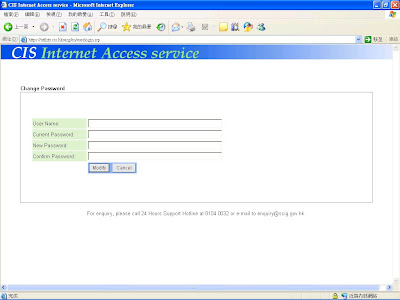
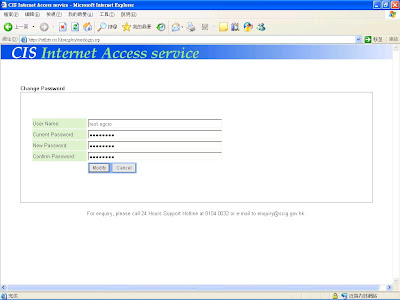
By entering the username, current password, new passwords and press the “Modify” button, the password will be changed (Figure 6 & 7). Users are required to change their passwords periodically for security reason.

3.2 System Log Out
By clicking the “Log Out” link of the “User Utilities” page (Figure 4), users will be logged out of the CIS Internet Access service and system login will be required if users need to login again for the service (Figure 8).

FOR THE OFFICE OF THE GOVERNMENT CHIEF INFORMATION OFFICER
USER GUIDE Version: 1.1
1.0 Introduction
The Internet Access services of Central Internet Services enables government users to access the Internet access efficiently and reliably for their daily operational and business needs. The user interfaces for system logon and password maintenance are so designed to assure security and usage simplicity. This document provides guidelines on the steps that users will involve when using the IA services.
2.0 System Login
Users need to login the IAGS system successfully before able to use the CIS Internet Access services. Users can open a browser and start the Internet access by typing an URL in the browser (e.g. http://www.yahoo.com). The page will be redirected to the CIS Internet Access service login page (Figure 1) if the user is not already login. (Remarks: - do not access a site that requires SSL encryption (e.g. URL starts with https) during the first time Internet access (e.g. https://www.gmail.com).

Figure 1
With the redirected login page (Figure 1), users need to login using their usernames and the new passwords assigned in order to use the Internet services (Figure 2). Users should obtain their new passwords through the online Password Distribution System (PDS). Details on how to obtain new password through PDS please refer to CIS Theme Pages for the New Internet Access Services.

Figure 2
After clicking the “Log In” button in the login page (Figure 2), users can access the desired Internet web sites they have specified.
3.0 User Utilities
Users of IA services can access usage utilities through the “User Utilities” page (http://utility.cis.hksarg) (Figure 4). User may change the password, logout the CIS Internet Access service or refer to the CIS Guidelines by clicking the hyperlinks.

Figure 4
3.1 Change Password
Password Policy:
1) contain at least 8 characters;
2) contain at least 1 digit AND 1 alphabet;
3) change at least once for every 3 months;
4) cannot reuse last 12 used passwords;
By clicking the “Change Password” link, user will be redirected to the change password page (Figure 5).

Figure 5
By entering the username, current password, new passwords and press the “Modify” button, the password will be changed (Figure 6 & 7). Users are required to change their passwords periodically for security reason.

Figure 6

Figure 7
3.2 System Log Out
By clicking the “Log Out” link of the “User Utilities” page (Figure 4), users will be logged out of the CIS Internet Access service and system login will be required if users need to login again for the service (Figure 8).

Figure 8
訂閱:
意見 (Atom)