顯示具有 電腦知識 標籤的文章。 顯示所有文章

星期六, 3月 24, 2012

Change the displayed name of CIS webmail

 問:How to change the name of user in CIS Webmail?
         如何更改 CIS Webmail 的使用者姓名?


答:
  1. Use Internet Explorer to login the account via http://wmaila.scig.gov.hk
    使用 Internet Explorer 在 http://wmaila.scig.gov.hk 登入帳戶
  2. Click Preferences
    點擊 Preferences
  3. Click Mail
    點擊 Mail
  4. Select "DefaultMailAccount[IMAP]"
    選擇 "DefaultMailAccount[IMAP]"
  5. Click Edit
    點擊 Edit
  6. Change the Name
    更改名稱
  7. Click OK
    點擊 OK

星期五, 5月 20, 2011

Microsoft(R) Office Word 2007 中文版應用測驗

測驗內容為一般商業文書處理軟件應用技巧,包括(但不限於)下列範圍:
  1. 文字處理技巧:
    • 插入日期及時間

      插入索引標籤 è文字群組è日期及時間指令
    • 插入註腳
       

      參考資料索引標籤è註腳群組è插入註腳指令 
    • 插入圖文框

      插入索引標籤 è文字群組è文字方塊指令

                                右鍵 è

星期一, 5月 02, 2011

Confidential email - Failed to connect smart card or key file

Q: A user found that she cannot open CM in her Lotus Notes, the following message was displayed.
What should we do to prevent the user to met the token error when accessing confidential email?


Ans:
If the key file is exist then
    If e-token can locate the key file then
        restart Lotus Notes to try again
    else try to unplug the token and plug it before excute the LN
else try to replace the token.

星期日, 5月 01, 2011

win 7 如何才能搜尋文件內容

Q: 我的 Windows 7索引搜尋功能只能搜尋文件的檔案名稱,而在文件內的文字 (如:word 及 excel 裡的字串) 卻搜尋不到,請問可以如何調整呢?

A:

方法一:
在檔案總管裡,選左上的「組合管理」>「資料夾和搜尋選項」


在「搜尋」頁裡,將「搜尋目標」由「在已編製索引位置搜尋檔案名稱及內容。在未編製索引的位置,則只搜尋檔案名稱(I)」改為「一律搜尋檔案名稱及內容 (這可能需要幾分鐘)(C)」。


方法二:
新增索引位置。

星期日, 4月 24, 2011

開機時顯示 "please wait for IDE scan"

問:
電腦啟動時顯示「please wait for IDE scan」,如何取消?

答:
可以在BIOS頁面將RAID關掉,但可能會有部份硬盤不能使用。
例如 GIGABYTE 中 Socket 775 - 945P 的 GA-8I945P-G,有一個紅色的IDE port及兩個綠色的IDE port。關掉RAID後兩個綠色的IDE 接口便不能使用了。

星期四, 4月 14, 2011

Microsoft Windows XP 變數

有時編寫執行檔時,可能會因為使用者名稱不同而不能執行成功。
假若遇到這個情況,系統變數便可以簡化問題了。
以下是 Ms Windows XP 及 Windows 7 的例子:


變數
Win XP 例子
Win 7例子
%LOGONSERVER%
\\127.0.0.1
\\127.0.0.1
%HOMEDRIVE%
C:\
C:\
%SystemDrive%
C:\
C:\
%AllUsersProfile%
C:\Documents and Settings\All Users
C:\ProgramData
%HOMEPATH%
C:\Documents and Settings\wfh
C:\Users\wfh
%USERPROFILE%
C:\Documents and Settings\wfh
C:\Users\wfh
%APPDATA%
C:\Documents and Settings\wfh\Application Data
C:\Users\wfh\AppData\Roaming
%Temp%
C:\Documents and Settings\wfh\Local Settings\Temp
C:\Users\Ben\AppData\Local\Temp
%Tmp%
C:\Documents and Settings\wfh\Local Settings\Temp
C:\Users\Ben\AppData\Local\Temp
%USERPROFILE%\My Documents\
C:\Documents and Settings\wfh\My Documents\
%ProgramFiles%
C:\Program Files
C:\Program Files
%commonprogramfiles%
C:\Program Files\Common Files
%SystemRoot%
C:\WINDOWS
C:\Windows
%windir%
C:\WINDOWS
C:\Windows
%ComSpec%
C:\WINDOWS\system32\cmd.exe
%PSModulePath%
C:\WINDOWS\system32\WindowsPowerShell\v1.0\Modules
C:\Windows\system32\WindowsPowerShell\v1.0\Modules

===========================


batch file 應用例子:

@echo off
:: 設定變數 drive 為 G:\Backup
set drive=G:\Backup
 :: 設定變數 backupcmd 為 xcopy /s /c /d /e /h /i /r /y
set backupcmd=xcopy /s /c /d /e /h /i /r /y

echo 備份我的文件至 G:\Backup\My Documents ...
%backupcmd% "%USERPROFILE%\My Documents" "%drive%\My Documents"

echo 備份我的最愛至 G:\Backup\Favorites...
%backupcmd% "%USERPROFILE%\Favorites" "%drive%\Favorites"

echo 備份 Outlook Express...
%backupcmd% "%USERPROFILE%\Application Data\Microsoft\Address Book" "%drive%\Address Book"
%backupcmd% "%USERPROFILE%\Local Settings\Application Data\Identities" "%drive%\Outlook Express"

echo 備份 Ms Outlook...
%backupcmd% "%USERPROFILE%\Local Settings\Application Data\Microsoft\Outlook" "%drive%\Outlook"

echo 備份登錄檔...
if not exist "%drive%\Registry" mkdir "%drive%\Registry"
if exist "%drive%\Registry\regbackup.reg" del "%drive%\Registry\regbackup.reg"
regedit /e "%drive%\Registry\regbackup.reg"

:: use below syntax to backup other directories...
:: %backupcmd% "...source directory..." "%drive%\...destination dir..."

echo 備份完成
pause

試想像,假若目標使用者的視窗安裝在 D:\ ,而且你不知道對方的使用者名稱,在不使用變數的情況下便十分麻煩了。

===========================

如果希望新增 / 修改 Win xp 的變數,你可以:

1. 在「我的電腦」的空白位置單擊右鍵,然後點選「內容」

2. 在「系統內容」的「進階」分頁,點選「環境變數」

3. 在下方的「系統變數」,你可以找到 「TMP」 等大部份變數了

===========================
如果希望新增 / 修改 Win 7 的變數,你可以:

1. 在「我的電腦」的空白位置單擊右鍵,然後點選「內容」


2. 點選「進階系統設定」

3. 在「系統內容」的「進階」分頁,點選「環境變數」


4. 在下方的「系統變數」,你可以找到 「TMP」 等大部份變數了


星期五, 4月 08, 2011

Default boot.ini for Microsoft Windows XP

Directory boot.ini of Ms Win XP: C:\
Path of boot.ini: C:\boot.ini

Original setting of boot.ini:

[boot loader]
timeout=30
default=multi(0)disk(0)rdisk(0)partition(1)\WINDOWS
[operating systems]
multi(0)disk(0)rdisk(0)partition(1)\WINDOWS="Microsoft Windows XP Professional" /fastdetect /NoExecute=OptIn

星期五, 4月 01, 2011

Easeus Partition Master

一般來說,當想起分割/合併/調整硬盤容量時,大部份人都會想起老牌程式 - Partition Magic。

可惜 Partition Magic 並不能在 windows 7  使用,如果需要使用類似 Partition Magic 的功能,可以使用 Easeus Partition Master。

支援作業系統: Windows 2000/XP/Vista/Windows 7 (包括 SP1) 32 bit 及 64 bit

星期三, 3月 23, 2011

有紅色虛線出現在顯示器

問:
我的電腦安裝了 window 7, 每次開機時會有一條紅色虛線出現在顯示器。
任何頁面也有相同情況,請問如何解决呢?

答:
如果你未開始載入 windows (見到 windows logo 可定義為開始載入 windows),在 POST 或 BIOS 的時候已經開始有紅色虛線,不排除與硬件有關,而與 windows 及其他軟件無關。

硬件問題可能包括:
- monitor
- VGA 線 (或其他連接電腦及顯示器的線)
- Display card (或者 on-board display)
- KVM Switch 之類既 video 中轉硬件

建議你向友人借 monitor 及 VGA 線等,以方便測試~

星期二, 3月 22, 2011

廠機轉 Window 問題

問:
請問廠機想安裝自購的 operation system 可以嗎?

答:
當然可以,只是有可能要自行上官網下載廠機的 driver 及 software,不同於 recovery disc 會自帶 driver、software 及系統更新。
另外,如果保養需要重灌系統,維修師傳亦只會幫你安裝購買電腦時所附帶的 windows。

星期五, 3月 18, 2011

Lotus Notes R5 如何能夠正常顯示香港字符 ?

問:我的電腦已經安裝了 Microsoft 的 香港增補字符集,在 Internet Explorer 亦能夠顯示香港常用字。但發現 Lotus Notes R5 未能顯示香港常用字,


答:請檢查你的 LN 是否已經啟用 Unicode,並且字型支援 Unicode 。


1. 請先到 File > Preferences > User Preferences...


2. 在 Additional Options 中查看是否已剔選 Enable Unicode display


3. 然後在 Display Options 中單擊一下 Default Fonts...


4. 在 Default Fonts 的 Default Sans Serif font 選擇可以正常顯示 unicode 的字體,如:Arial


5. 重新開啟 Lotus 便大功告成了。

星期日, 3月 13, 2011

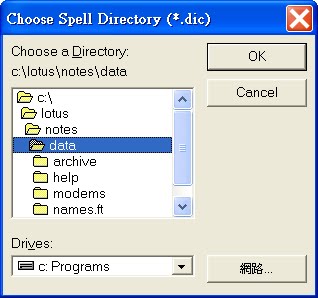
Choose Spell Directory (*.dic)

Q:
The error "File Does not exit:UK.Dic" popup, when we press on the send button at Lotus Client R5.0.9. We can't send any mail thru this client and we can't find the *.dic file at that PC. It happen at certain workstation only. We can't resolve event we reinstall the client. Pleass advice. Thanks.


A:


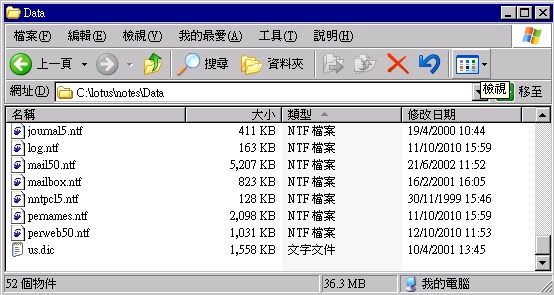
Normally, you may find the dictionary file in the following path or directory:
"C:\lotus\notes\Data"


You may try to copy *.dic from other computers, or just turn off the Spell Checking.
"Automatically check mail messages for misspellings before sending"


p.s. you may also try to reinstall the LN after backup and delete all things the "c:\Lotus"

推薦此文